
What is MOTO? #
MOTO payments are a type of card-not-present (CNP) transaction where customers provide their payment card information over the phone, by mail, or via email, rather than in person or through a website. The acronym stands for Mail Order/Telephone Order, reflecting the traditional methods used to collect payment details. This method allows businesses to accept payments from customers who cannot physically visit a store or prefer not to use online payment systems. These are classified as card payments, not open banking payments.
How does the process work? #
Because the payment is not instantly verified by the payer (e.g. fingerprint on banking app or by inputting the CVV/CV2), there is a slight difference in how the payment is processed. There is also inherently a higher risk to the payment – because the payment is processed at distance, you as the merchant cannot be sure the card has not been stolen and is being used fraudulently. This does mean there’s a greater risk of chargebacks being opened against you.
Using MOTO on Trustist Payments #
- Merchant team open virtual terminal on computer
- Customer provides card detail over the phone
- Merchant team process payment
- Merchant notified of successful payment
- Payment automatically captured 5 days later – this delay allows you to void the payment if necessary.
- Payment received 2 days later
How the terminal looks to the merchant #
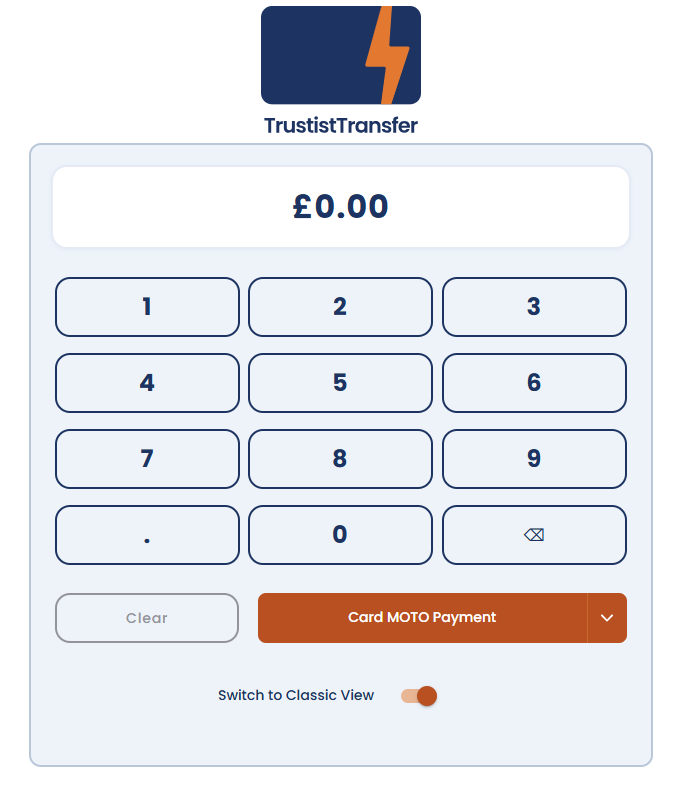
If you don’t see this option immediately on the screen, click on the orange bar which says ‘Standard Payment’ and select ‘MOTO payment’.
You can then take payments over the phone.
Should I only use MOTO? #
We recommend only using MOTO when necessary as there is a much higher risk of chargebacks.
For all non-telephone payments, we recommend sending the PayLink to your customer. This adds an extra layer of protection to the transaction.
I think I need MOTO – what do I do next? #
Please email the team on customerservice@trustisttransfer.com and let us know about how you’ll be using the system – we can ask for any further details or discuss with you as needed.
